


Deputy: Employee Scheduling
4.72.04K Reviews
App Specs
- Version
- 26.33.0
- Updated On
- License
- Free
- Downloads
- 1,000,000+
- Developer
- Deputy.com
- Categories
- Business
- Platform
- Android
Screenshots
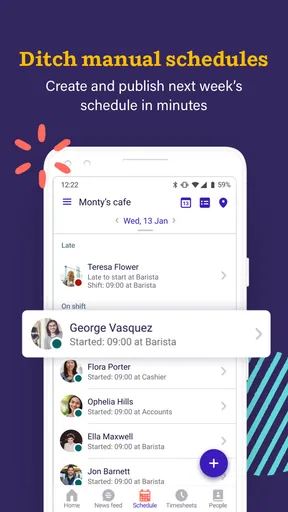
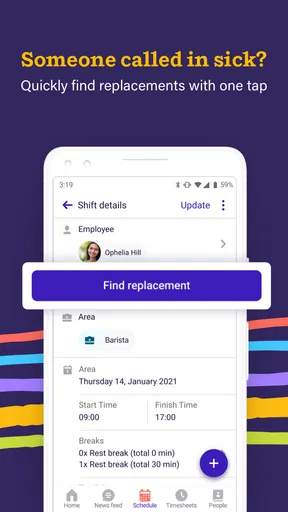
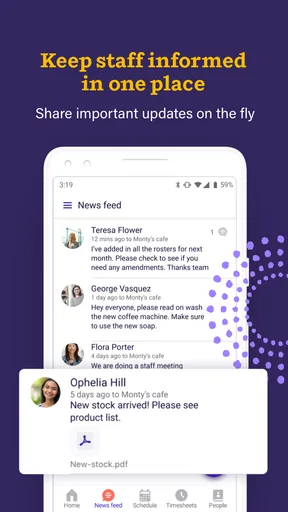
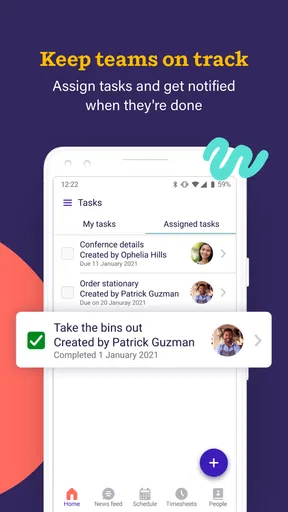
 Analysis by AppCompare
I look at Deputy: Employee Scheduling as a practical business app for teams that need a shared way to organize shifts rather than rely on paper rotas, scattered messages, or a spreadsheet that only one person remembers to update. My first impression is that it is aimed at the daily reality of workplaces where availability changes, people need to know when they are working, and managers need a clearer view of coverage.
The app is developed by Deputy.com and is available free of charge to install, with optional in-app purchases ranging from $0.99 to $99.99 per item. It is rated for Everyone, which makes the app approachable from an age-rating perspective, although the workplace information handled through any scheduling service still deserves careful attention. The Android release has been around since August 21, 2013, and the current version is 26.33.0, with support beginning at Android 7.0.
What makes it worth considering is not the promise of a perfect automated workplace, but the possibility of putting scheduling decisions in one visible place. The app has an average rating of 4.7 from around 19 thousand ratings, with over 1 million installs, so it has clearly attracted substantial interest. I would still treat those figures as a starting point rather than proof that it suits every business: shift patterns, approval habits, privacy expectations, and team size matter much more than popularity alone.
How Deputy fits into a real scheduling routine
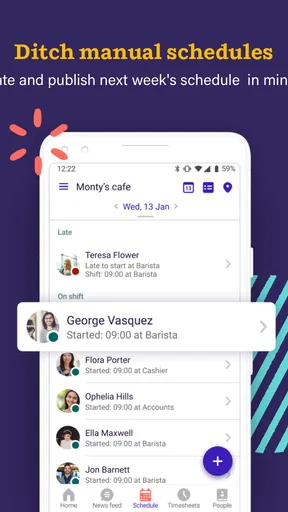
In a small café, shop, salon, care team, or similar workplace, the problem is often not creating the first schedule. The harder part is keeping it understandable after someone asks for a change, a manager moves a shift, or an employee forgets which version of the rota is current. A dedicated scheduling app can reduce that confusion because the schedule becomes a shared reference instead of a chain of conversations.
I would begin by treating the app as a central noticeboard, not as a replacement for every management process. A manager can use it to plan coverage, while employees use their phones to check the shifts that affect them. That division is important. People should not have to decode the manager’s private planning notes, and managers should not have to rebuild the entire schedule every time a worker asks a simple question.
A realistic example is a weekend retail team. On Monday, the supervisor prepares the coming week. By Wednesday, one employee realizes that a personal appointment conflicts with a Saturday shift. Instead of sending the request to several coworkers and hoping everyone sees the same message, the team can use the scheduling workflow as the place where the issue is raised and reviewed. The useful gain is not merely speed; it is a clearer record of what the team believes the current plan to be.
That said, the app will not solve poor planning by itself. If a manager publishes shifts late, changes them informally, or fails to communicate the reason for a decision, a digital schedule can still feel chaotic. I found it more useful when the person responsible for the rota agrees on a simple routine: prepare early, review coverage before publishing, and make changes in the same place rather than mixing the app with private texts and handwritten notes.
Worth Reading Before You Choose

EA SPORTS FC Mobile 26 Is a Bigger Football Game, but It Takes Time

Flipboard Shows What News Apps Must Do Beyond the Feed

Switching to Android Auto Means Rethinking Your Driving Routine

Google Calendar Makes a Crowded Week Easier to Manage

Ludo King Makes the Most of the Minutes Between Plans

Baby Panda World Brings Quick Play to Modern Phones, but Its Game Library Feels Busy
Who benefits most from a dedicated work schedule
The strongest fit is a team with recurring shifts and several people who need access to the same plan. Businesses with hourly staff can benefit because the schedule is more visible than a spreadsheet attached to an email. A manager who handles multiple locations or rotating teams may also appreciate having a work-focused tool instead of adapting a general calendar that was designed for personal appointments.
It is particularly useful when the schedule changes often enough that an old document becomes risky, but not so unpredictably that planning is impossible. A stable weekly pattern gives the manager something to build from, while occasional changes give the app a meaningful job to do. Employees who mainly need to check when they work may find the focused purpose easier than navigating a large business platform.
I would be more cautious for a very small team where everyone already works together directly and the rota changes only once in a while. In that situation, an ordinary calendar or a carefully maintained shared document may be quicker and less effort. The same applies to a business that needs deep payroll, accounting, human-resources, or complex workforce-management functions as its main priority. A scheduling app can be an important piece, but it should not automatically be treated as a complete operations system.
What to check before asking a team to rely on it
The first question is not whether the interface looks convenient. It is whether the team will actually use one shared process. Before moving everyone over, I would decide who is allowed to create or edit schedules, who reviews changes, and how employees are expected to report conflicts. Those decisions prevent the common mistake of installing a tool without agreeing on the rules around it.
The second question concerns account access. Every employee should understand which account belongs to them, how they are expected to sign in, and what to do if access becomes difficult. Managers should avoid sharing one login across a whole team, because shared credentials make it harder to know who changed a schedule and weaken individual control over workplace information.
The third question is practical: will the app fit the team’s phones and habits? Android support begins at version 7.0, which covers many devices, but a company should still check the actual phones used by its staff. A technically supported app can remain inconvenient if some employees have limited storage, unreliable connectivity, or little experience with workplace software. A short trial with a real week of shifts is more revealing than a quick installation test.
Trust, controls, and moments that deserve care
When I assess a business app, I do not view a high rating as a substitute for sensible data handling. Scheduling naturally involves information about people’s working lives. Even when the app’s main purpose is straightforward, the account and schedule deserve the same care as any other workplace record. I would read the current privacy and account information shown during setup and in the relevant store or service screens, then make sure the team knows what it is agreeing to.
The most important visible control is the distinction between an employee account and a manager’s role. A schedule should not be treated as a public noticeboard where everyone can casually edit everything. Before publishing a live rota, I would inspect the available account roles and permission choices in the organization’s setup, then give each person only the access needed for their job. If a team cannot clearly explain who can change a shift, that is a process problem worth fixing before launch.
I also pay attention to the moment when a schedule is changed. This is where trust can break down. A shift that moves from an afternoon to an evening may affect transport, childcare, or another job. The app is most helpful when the team treats a change as a meaningful event rather than a quiet edit. Managers should review the result after making changes, and employees should know where to look for the current version instead of relying on an old screenshot.
Another sensitive moment is account recovery or staff turnover. When someone leaves, the manager should review that person’s access rather than assuming the account will take care of itself. When a new employee joins, the manager should provide only the information needed for that person’s work. These are ordinary administrative steps, but they matter more in a scheduling tool because the information is tied to real people and real locations.
I would also avoid putting unnecessary personal details into shift labels, notes, or comments. If a manager needs to record that someone is unavailable, a short operational note is generally easier to control than a detailed explanation of a private situation. The app may make it easy to type more, but convenience is not a reason to collect or circulate more personal information than the team needs.
Where user choice matters most
Deputy is more trustworthy in practice when employees know what they can control and what remains a management decision. A worker may be able to view assigned shifts or raise a conflict, while the manager remains responsible for approving the final schedule. Explaining that boundary prevents disappointment and reduces the temptation to use informal workarounds when a request is not immediately accepted.
I would give employees a short orientation based on real tasks: find the next shift, check a change, report a conflict, and confirm whom to contact if the schedule appears wrong. This is more useful than a long tour of every screen. It also reveals whether the app is genuinely accessible to the team or whether some people need an alternative communication method while they learn it.
Managers should make a habit of checking the schedule from the employee perspective. A rota can look complete in an administrative view while still being confusing to the person trying to understand their own week. Look for unclear shift names, overlapping assignments, missing locations, or changes that could be mistaken for the original plan. This review is one of the most valuable quality checks because it catches communication failures before they become attendance problems.
There is a trade-off between centralization and flexibility. Keeping everything in one scheduling tool makes the current plan easier to find, but it can feel restrictive to teams that prefer quick informal decisions. My advice is to keep the official schedule in Deputy while allowing normal human conversation around it, as long as the final decision is reflected in the official record. That gives the team flexibility without creating several competing versions of the truth.
Practical strengths and everyday friction
The app’s main strength is focus. It is built around work scheduling, so a team can approach it with a specific question: who is working, when, and under whose responsibility? That is clearer than bending a personal calendar into a staff rota. The dedicated context also makes it easier to discuss scheduling as a shared operational task rather than as a private reminder.
The main friction is that a schedule is only as reliable as the person maintaining it. If the manager does not update changes promptly, employees may still depend on messages or screenshots. I would establish one rule from the beginning: once a change is agreed, the official schedule must be updated immediately. Without that discipline, the app becomes another place to check instead of the place everyone trusts.
The free installation is helpful for trying the workflow, but businesses should examine the purchase choices carefully before committing to a larger rollout. Optional items range from $0.99 to $99.99 each, so the practical cost depends on what the organization selects and how broadly it uses the service. I would test the exact account and team setup first, then review the payment screens and terms with whoever manages the company budget.
The content rating of Everyone may reassure families and mixed-age workplaces that the app is not presented as mature entertainment, but that rating should not be confused with a complete workplace privacy assessment. Age suitability and data responsibility are different questions. I would still explain to staff what information the organization expects them to enter and who is responsible for managing access.
How it compares with calendars, spreadsheets, and messages
A shared calendar is often the simplest alternative. It can work well for a tiny team with predictable appointments, especially when nobody needs a dedicated employee-scheduling workflow. Its weakness is that personal and work events can become mixed together, and a calendar may not make staffing coverage easy to understand. Deputy makes more sense when the schedule itself is the central object rather than one appointment type among many.
Spreadsheets offer flexibility and familiar formulas, which can be valuable for a manager who wants to calculate hours or model several staffing options. They also create version-control problems. A file may be copied, edited offline, or viewed without the latest change. I would choose a spreadsheet when custom calculations matter more than employee-facing simplicity, but I would be wary of using it as the only live communication channel for a busy shift team.
Group messaging is fast and familiar, yet it is a poor long-term archive for a rota. A shift change can disappear under unrelated conversation, and new employees may struggle to reconstruct the history. Messages remain useful for urgent human communication, but I would not use them as the official schedule when the team has regular changes or several supervisors.
Deputy sits between those options: more structured than messages, more purpose-built than a general calendar, and potentially easier for staff to consult than a manager-designed spreadsheet. It is not automatically better for every organization. The deciding factor is whether the business needs a shared scheduling process with clearer ownership and employee access, rather than merely a place to write down dates.
My cautious verdict for different kinds of teams
I would recommend trying Deputy to a small or midsize workplace that is losing time to schedule confusion, especially when several employees need to see the same shifts and managers are tired of correcting outdated versions. The app’s long availability, current version 26.33.0, and broad adoption make it a credible candidate for a structured trial, while the 4.7 average from around 19 thousand ratings suggests that many users find value in its approach.
I would not recommend adopting it blindly for a business with strict data requirements, unusually complex workforce rules, or a strong need to keep all operations inside an existing enterprise platform. In those cases, the right choice may be a more comprehensive workforce system or a tool already approved by the organization’s security and human-resources teams. The question is not whether Deputy can schedule shifts; it is whether its controls, cost, and workflow match the company’s responsibilities.
My best implementation tip is to run one complete scheduling cycle before making it mandatory. Include a normal week, one availability conflict, one manager edit, one new employee, and one account-access question. Watch where people hesitate. Then simplify the team rules, review the visible account controls, and decide whether the optional purchases provide enough value for the actual group.
After using it in that measured way, I see Deputy as a useful, focused choice rather than a magic fix. It can give a team a clearer shared schedule and reduce dependence on scattered updates, but trust comes from good permissions, careful notes, prompt changes, and clear human responsibility. If your workplace needs one dependable place to coordinate recurring shifts, it is worth a controlled trial; if you only need an occasional shared calendar, its extra structure may be unnecessary.
For me, that is the honest recommendation: start small, keep sensitive details limited, check who can see and change the schedule, and make sure the final rota is always the one employees consult. Used with that discipline, this business app can make everyday shift planning calmer without pretending that software can replace good management.
Pros
- Quick shift creation with reusable templates
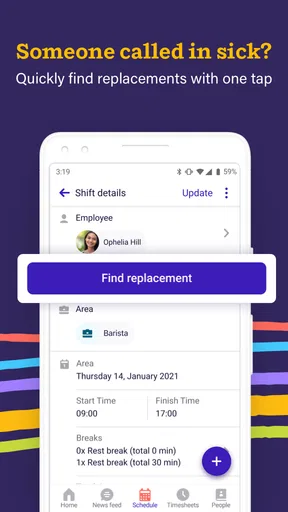
- Employees can swap shifts and request leave in-app
- Useful labor-cost and attendance reporting tools
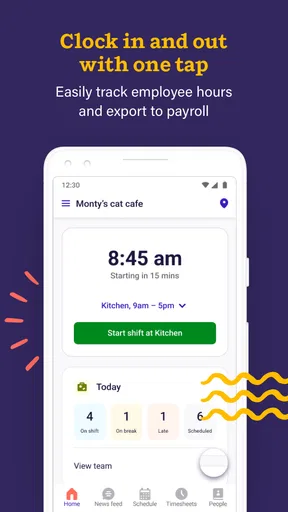
- Supports GPS-based clock-ins for mobile teams
- Integrates with several payroll and business platforms
Cons
- Some advanced features require higher-priced subscription plans
- Setup can take time for complex workplace rules
- Mobile experience depends heavily on a stable internet connection
- GPS tracking may raise privacy concerns for some employees
- Reports may feel limited without careful configuration
FAQs for Deputy: Employee Scheduling
What is Deputy: Employee Scheduling used for?
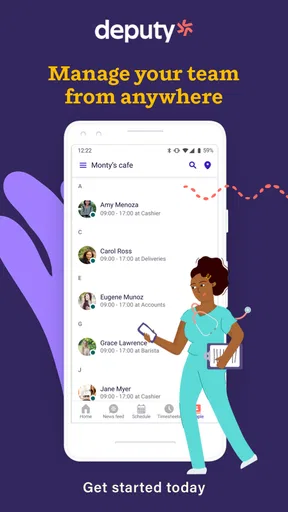
Deputy: Employee Scheduling is a workforce management app designed to help businesses organize employee shifts, track availability, manage time and attendance, and communicate schedule updates. Managers can create and publish rosters, while employees can view upcoming shifts, request changes, swap shifts when permitted, and clock in or out. It is mainly aimed at teams working in retail, hospitality, healthcare, and other shift-based industries.
Can employees use Deputy to view and manage their work schedules?
Yes. Employees can use Deputy to check their upcoming shifts, review workplace announcements, submit availability, and request leave or schedule changes, depending on the permissions configured by their employer. Some workplaces may also allow shift swapping or open-shift claiming. The exact features available can differ because administrators control how the account is set up and which actions employees are allowed to perform.
Does Deputy support time tracking and clocking in or out?
Deputy includes time and attendance tools that can let employees clock in and out through the mobile app or another approved workplace device. Depending on the employer’s configuration, the app may use location information, geofencing, or other controls to confirm that a worker is at the correct job site. Employees should review their company’s privacy and attendance policies before enabling these features.
Is Deputy: Employee Scheduling free to download and use?
The Deputy mobile app may be available to download at no charge, but access to its scheduling and workforce management features generally depends on an employer’s Deputy subscription. Employees usually join through an invitation or workplace account rather than purchasing an individual plan. Pricing, trials, feature availability, and billing are handled by Deputy and the organization using the service, so they can vary over time.
What should I know about privacy and permissions before installing Deputy?
Deputy may request permissions such as notifications, calendar access, location services, camera access, or device storage, depending on the features enabled by your workplace. Location access can be relevant for clock-in verification, while notifications help deliver schedule changes and messages promptly. Before accepting permissions, check the app’s privacy information and ask your employer how employee data is collected, used, stored, and shared.


